Free QR Code Generator: Create QR Codes for Websites & WiFi
Create a free QR code for your website, WiFi, business card, menu, or marketing campaign in seconds. Learn how QR codes work, where to use them, and how to make sure they scan correctly.
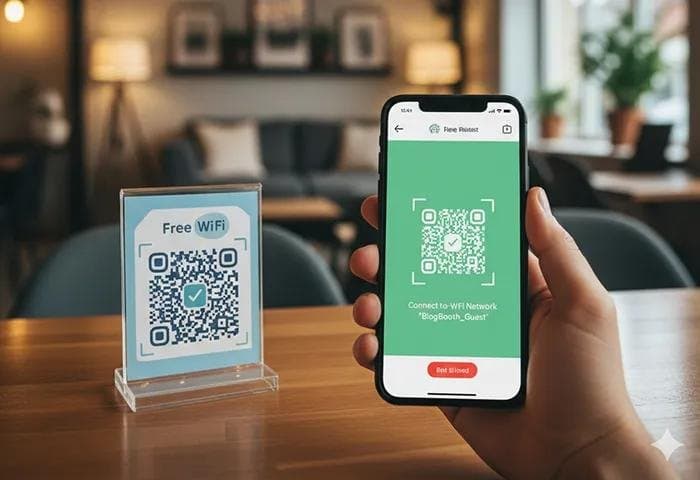
QR codes are everywhere.
You see them on restaurant menus, product packaging, business cards, event tickets, posters, receipts, advertisements, and even shop windows. Instead of typing a long website address or searching for information manually, people can simply point their phone camera at a QR code and open the information instantly.
The good news is that creating one doesn't have to be complicated or expensive.
With a free QR code generator, you can turn a website URL, text, contact information, WiFi details, or other information into a scannable QR code in just a few seconds.
In this guide, we'll explain what a QR code is, how QR codes work, how to create one, where you can use them, and what to check before printing or sharing your QR code.
What Is a QR Code?
A QR code, short for Quick Response code, is a two-dimensional barcode that can store information in a format that smartphones can quickly read.
Unlike traditional barcodes, which usually store information horizontally, QR codes use a grid of black and white modules. This allows them to store more information and makes them useful for many different purposes.
A typical QR code can contain or point to:
A website URL
Plain text
WiFi network information
Contact details
An email address
A phone number
A location
An event or registration page
A product page
A payment or donation page
The most common use is probably a URL QR code. Someone scans it with their phone and is taken directly to a webpage without manually typing the address.
How Does a QR Code Work?
The process is surprisingly simple.
When you create a QR code, the information you provide is converted into a visual pattern. That pattern contains the data needed to interpret the information.
When someone scans the code with a compatible smartphone camera or QR scanner:
The camera detects the QR code.
The phone recognizes its pattern.
The encoded information is decoded.
The appropriate action is displayed.
The user can open the website, connect to WiFi, save contact information, or perform another supported action.
For example, imagine you have a website:
https://example.com
Instead of asking customers to type that URL, you can generate a QR code for the URL and place it on your business card.
A customer scans it and goes directly to your website.
How to Create a QR Code for Free
Creating a QR code doesn't require design software or technical knowledge.
You can use the 👉 Synctoolo QR Code Generator to quickly create a QR code from the information you want to share.
Step 1: Choose What You Want to Share
First, decide what the QR code should contain.
For example:
Website URL
Text
Contact information
WiFi details
Email address
Phone number
Product link
Social media profile
For a website QR code, simply copy the webpage URL.
Step 2: Enter the Information
Open the QR code generator and enter your information into the appropriate field.
If you're creating a QR code for a website, make sure the URL is correct before generating the code.
A small mistake in the URL can send users to the wrong page.
Step 3: Generate the QR Code
Once your information is entered, generate the QR code.
The tool converts your information into a QR pattern that smartphones can scan.
Step 4: Test It
This step is easy to overlook.
Before printing your QR code on hundreds of flyers or business cards, scan it with a phone.
Make sure:
The code scans quickly.
The correct page opens.
The URL works on mobile.
The QR code isn't cropped.
The contrast is easy to see.
Step 5: Download and Use It
Once you've tested it, download the QR code and use it wherever you need it.
You can add it to printed materials, websites, presentations, packaging, menus, signs, or marketing campaigns.
What Can You Use a QR Code For?
QR codes aren't limited to websites.
Here are some of the most useful applications.
1. Website QR Codes
A website QR code makes it easier for people to visit a webpage from printed material.
For example, a business could put a QR code on:
Flyers
Posters
Business cards
Brochures
Product packaging
Store displays
Instead of typing the website address, customers simply scan.
2. WiFi QR Codes
WiFi QR codes can make sharing a wireless network much easier.
Instead of spelling out a complicated WiFi password, you can create a QR code containing the network information.
Guests can scan it with a compatible phone and connect without manually typing the password.
This can be especially useful for:
Restaurants
Hotels
Offices
Cafes
Homes
Events
3. Business Cards
Traditional business cards contain limited information.
A QR code can give your card an additional digital layer.
You can link it to:
Your portfolio
LinkedIn profile
Company website
Contact page
Digital business card
Appointment booking page
This means someone can go from holding your business card to viewing your online profile with one scan.
4. Restaurant Menus
Restaurants can place QR codes on tables so customers can access a digital menu.
This can reduce the need for printed menus and makes it easier to update menu information online.
A QR code can link directly to a mobile-friendly menu page.
5. Product Packaging
Businesses can use QR codes to connect physical products with digital information.
For example, a product QR code could lead to:
User instructions
Setup guides
Product videos
Warranty registration
Customer support
Product information
This is particularly useful when the printed packaging has limited space.
6. Event Registration
QR codes can also be used for events.
A poster could contain a QR code that sends visitors directly to a registration or ticket page.
This removes several steps from the process.
Instead of remembering a URL, users can scan the code and register immediately.
7. Social Media Profiles
Creators, freelancers, and businesses can use QR codes to make social profiles easier to access.
For example, a QR code could link directly to an Instagram, LinkedIn, YouTube, or other social profile.
This works particularly well for physical events and promotional materials.
Static vs Dynamic QR Codes
One important distinction to understand is the difference between static and dynamic QR codes.
Static QR Codes
A static QR code contains information directly in the code.
If you create a static QR code containing a specific URL, that URL generally cannot be changed without creating a new QR code.
Static codes can be useful when the information is permanent.
For example:
A business card containing a QR code pointing to a permanent company website.
Dynamic QR Codes
Dynamic QR codes typically point to a destination that can be changed or managed through a service.
This can allow the destination to be updated without replacing the physical QR code.
Dynamic systems may also offer additional features such as scan analytics, depending on the provider.
For simple personal or everyday use, a static QR code may be all you need.
Are QR Codes Free?
Yes, creating a QR code itself doesn't inherently require a paid subscription.
The important thing is to understand what you're actually paying for.
Some QR code services offer basic QR generation for free but charge for additional features such as:
Advanced analytics
Editable destinations
Custom branding
Campaign management
Detailed scan statistics
Expiration or management features
If you simply need a QR code that points to a website or contains basic information, a free QR code generator can often be enough.
How to Make a QR Code That Actually Scans
Generating a QR code is easy.
Generating one that people can reliably scan is where a little care matters.
Use Strong Contrast
QR codes need sufficient contrast between the code and its background.
A traditional dark QR code on a light background is usually easy for cameras to detect.
Avoid combinations where the QR pattern blends into the background.
Don't Make It Too Small
A QR code printed extremely small can become difficult to scan.
The ideal size depends on the scanning distance and the quality of the printed code.
A QR code on a large poster should generally be larger than one printed on a business card.
Leave Some Space Around It
Don't place text, graphics, or other design elements directly against the edges of the QR code.
The surrounding empty area helps scanners identify the code correctly.
Don't Distort the Code
Avoid stretching or squeezing a QR code.
Keep its proportions intact when resizing it.
Test Before Printing
Always scan the final version.
This is particularly important when you're adding the QR code to a design.
A QR code that works on your computer screen might become difficult to scan after being resized, compressed, printed, or placed on a complicated background.
Can You Customize a QR Code?
Yes, QR codes can sometimes be customized for branding and design.
You may see QR codes with:
Different colors
Rounded elements
Logos
Custom frames
Marketing text
Brand styling
However, customization should never come at the expense of readability.
The primary purpose of a QR code is to be scanned.
If your design makes the pattern difficult for cameras to recognize, the customization isn't helping.
Common QR Code Mistakes to Avoid
Before sharing your QR code, check these common mistakes.
Using the Wrong URL
One character can make a URL invalid.
Always test the destination.
Poor Color Contrast
A stylish QR code isn't useful if a phone can't recognize it.
Prioritize contrast over decoration.
Making It Too Small
If people have to hold their phones inches away from the code, your QR code probably needs to be larger.
Placing It on a Busy Background
Photos, gradients, patterns, and illustrations behind a QR code can interfere with scanning.
Keep the area around the code clean.
Forgetting Mobile Optimization
If your QR code sends users to a website, make sure that website works well on smartphones.
There's little benefit in creating a perfect QR code that leads to a page that's difficult to use on mobile.
Not Testing the Printed Version
Don't only test the QR code before putting it into your design.
Test the actual final version whenever possible.
Print it at its intended size and scan it from the distance users are likely to scan it.
QR Code Generator vs Manually Creating a QR Code
You could technically generate QR codes using programming libraries or developer tools.
But most people don't need to write code just to create a QR code.
A QR code generator online is much faster for everyday tasks.
It lets you:
Enter your information.
Generate the code.
Test it.
Download it.
Use it.
Developers may prefer a QR code library when generating thousands of codes automatically inside an application, but for an individual, marketer, student, freelancer, or small business, an online generator is usually more convenient.
Where Should You Put Your QR Code?
The best location depends on what you're trying to achieve.
For a restaurant, a QR code might work well on a table.
For a freelancer, a business card could be ideal.
For a product manufacturer, packaging may make more sense.
For an event organizer, posters and tickets are natural locations.
The key question is:
Will the person seeing this QR code have a reason to scan it?
A QR code shouldn't simply exist because it looks modern.
It should provide a useful next step.
QR Codes and the Future of Physical Marketing
QR codes are interesting because they connect two worlds.
Printed material is physical.
Websites, videos, forms, menus, and social profiles are digital.
A QR code creates a bridge between them.
A customer can see a poster in the real world and immediately move to a website. Someone can receive a business card and instantly open a portfolio. A restaurant customer can scan a table code and view a digital menu.
That simple transition is why QR codes remain useful across marketing, business, events, retail, hospitality, and everyday communication.
Create a Free QR Code with Synctoolo
You don't need complicated software to create a QR code.
If you need to turn a URL, text, or other information into a scannable code, try the free QR Code Generator on Synctoolo.
Enter your information, generate your QR code, test it, and you're ready to use it.
Create your QR code in seconds and turn a simple link into something people can scan instantly.
Frequently Asked Questions
What is the best free QR code generator?
The best QR code generator depends on what you need. For simple QR codes, look for a tool that is easy to use, generates the code quickly, and lets you download it without unnecessary complexity.
Can I create a QR code for a website?
Yes. Enter your website URL into a QR code generator and generate the code. When someone scans it, their phone can open the webpage.
Can I create a QR code for WiFi?
Yes. QR codes can contain WiFi network information, allowing compatible smartphones to connect without manually entering the password.
Do QR codes expire?
A static QR code does not inherently expire. However, the destination can stop working if the URL is removed or changed. Dynamic QR codes may have different rules depending on the service managing them.
Can I put a QR code on a business card?
Absolutely. A QR code can link a business card to a portfolio, website, LinkedIn profile, contact page, or digital business card.
Do QR codes need an app?
Many modern smartphones can scan QR codes directly through the built-in camera, although the exact experience depends on the device and operating system.
Can I print a QR code?
Yes. QR codes are commonly printed on business cards, menus, posters, packaging, flyers, signs, tickets, and other materials. Always test the printed version before distributing it.
How big should a QR code be?
There is no single size that works for every situation. The required size depends on factors such as scanning distance, printing quality, and the amount of information encoded. Larger scanning distances generally require a larger QR code.
Final Thoughts
QR codes are one of the simplest ways to connect offline experiences with online information.
Whether you're creating a QR code for your website, WiFi network, business card, restaurant menu, event, product, or marketing campaign, the process can take only a few seconds.
The important part isn't simply generating a QR code.
Make sure it works, scans easily, leads somewhere useful, and is tested before you share or print it.
When you need a quick and simple solution, a free QR code generator can save time and remove unnecessary technical steps.
Try Synctoolo's QR Code Generator and create your next QR code in seconds.
Tools mentioned in this article
FAQ
Do QR codes generated on Synctoolo ever expire?+
No. Synctoolo generates static QR codes where the URL or data is directly encoded into the matrix pattern. Static QR codes never expire and do not depend on external redirect servers.
Can I generate a QR code for WiFi without sharing passwords?+
Yes. The WiFi QR code format encodes the SSID, security type (WPA/WPA2/WEP), and password so guests can scan and connect instantly without typing credentials manually.
What image formats can I download?+
You can download high-resolution PNG images suitable for print posters, restaurant menus, product labels, and digital flyers with zero watermarks.
We build and review free, privacy-first tools at Synctoolo.
Keep reading

Convert temperatures between Celsius and Fahrenheit accurately. Learn the 9/5 formula, fast mental math estimation tricks, and key thermodynamic benchmarks.
Connect devices to wireless networks without typing passwords. Discover the underlying WIFI: URI scheme, hidden SSID handling, and WPA3 security standards.