How to Create SEO-Friendly URLs for Your Website
Learn how to create clean, readable, SEO-friendly URL slugs from titles and sentences. Discover why URL structure matters and how a free slug generator can save time.
You spend time writing a great blog title.
You optimize the content.
You create a good meta description.
Then you publish it with a URL like:
example.com/blog/how-to-create-a-great-blog-post-with-ai-and-get-more-traffic-in-2026
It works, but it's unnecessarily long.
A cleaner version might be:
example.com/blog/write-better-blog-posts-with-ai
That's the purpose of a URL slug.
A slug is the readable part of a URL that usually identifies a specific page or article. Creating a good slug isn't complicated, but doing it manually for dozens of pages can become repetitive.
A slug generator turns a title or sentence into a clean, lowercase, hyphen-separated URL that you can copy directly into your CMS, website, or application.
With Synctoolo's free Slug Generator, you can create a URL slug instantly without manually removing spaces, punctuation, and unnecessary characters.
Here is the Synctoolo Slug generator
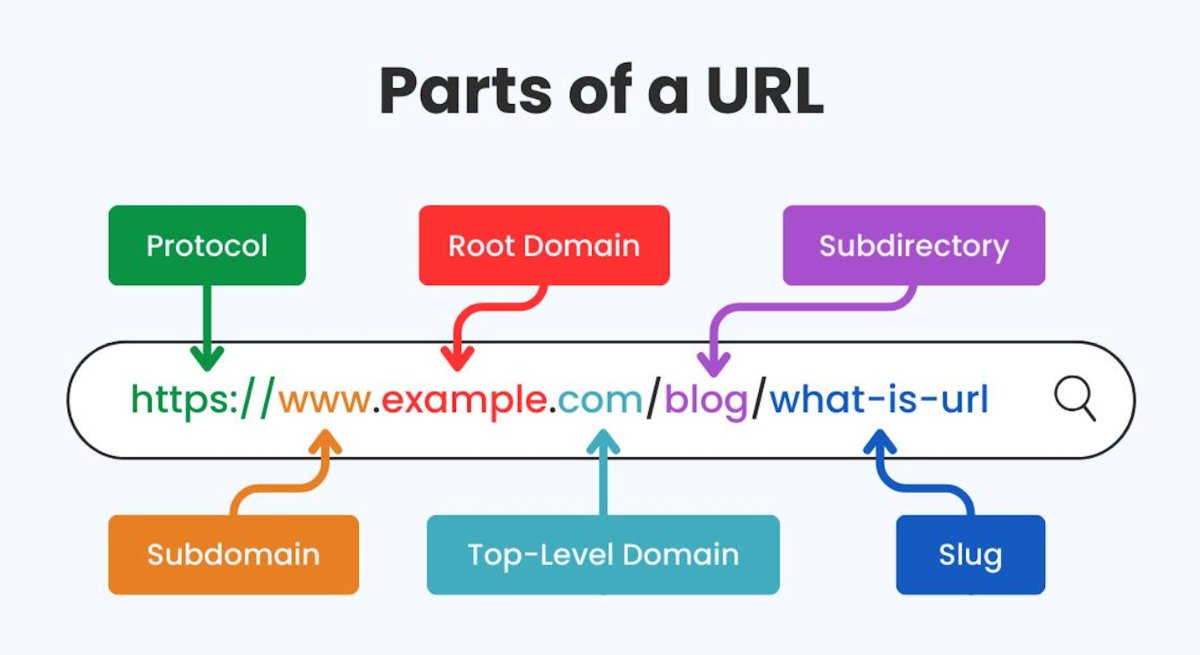
What Is a URL Slug?
A URL slug is the part of a webpage URL that describes the page.
For example:
https://example.com/blog/seo-friendly-url-guide
The slug is:
seo-friendly-url-guide
A good slug is generally:
Short
Readable
Descriptive
Lowercase
Separated with hyphens
Relevant to the page
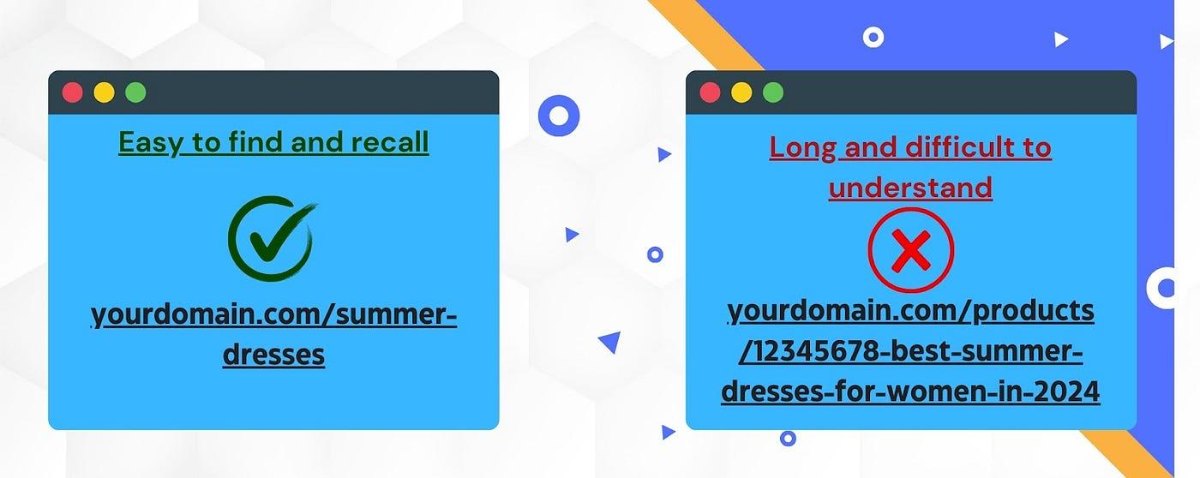
Compare these two examples:
Hard to read:
example.com/blog/how-to-create-seo-friendly-urls-for-your-website-in-2026
Cleaner:
example.com/blog/seo-friendly-urls
The second URL is easier for people to understand at a glance.
Why Do Website Owners Care About URL Slugs?
Your URL is one of the first things users can see before opening a page.
It can also help communicate what a page is about.
Imagine seeing these two links:
example.com/blog/article?id=82736
and
example.com/blog/how-to-write-seo-friendly-content
The second immediately tells you what you're likely to find on the page.
That's why creating SEO-friendly URLs is a useful part of website optimization.
A good slug doesn't guarantee that a page will rank higher, but a clear URL structure can make your website easier for users and search engines to understand.
What Makes a Good SEO-Friendly URL?
There's no reason to make URL slugs complicated.
A practical slug usually follows a few simple rules.
Keep It Short
Remove unnecessary words where possible.
Instead of:
how-to-create-a-simple-and-effective-seo-friendly-url-for-your-blog
consider:
create-seo-friendly-blog-url
The shorter version communicates the main topic without unnecessary words.
Use Hyphens Between Words
For web URLs, hyphens make individual words easier to distinguish.
For example:
best-seo-tools
is much easier to read than:
bestseotools
or:
best_seo_tools
Use Lowercase
A consistent lowercase format keeps URLs clean and avoids unnecessary variations.
For example:
/seo-tools
is cleaner than:
/SEO-Tools
Describe the Page
Your slug should give users an idea of what the page contains.
If your article is about writing YouTube titles, something like:
youtube-title-generator-guide
is more descriptive than:
article-123
URL Slug vs Page Title: What's the Difference?
A common mistake is assuming your page title and URL slug need to be identical.
They don't.
Your title can be longer and more engaging.
For example:
Page Title
How to Create SEO-Friendly URLs That Are Easy to Read
URL Slug
seo-friendly-urls
The title is designed to attract attention and explain the topic.
The slug is designed to provide a clean, concise URL.
Keeping the two related is useful, but there is no need to copy every word from the title into the URL.
When Should You Use a Slug Generator?
A URL slug generator becomes especially useful when you're creating content regularly.
For example, you might be publishing:
Blog posts
Product pages
Landing pages
Documentation
Tutorials
Category pages
News articles
Portfolio pages
Marketing pages
If you're only creating one URL, manually writing the slug takes a few seconds.
But when you're managing a website with dozens or hundreds of pages, those small tasks add up.
A slug generator automates the repetitive part.
Creating Blog URLs Without the Manual Work
Let's say your blog title is:
How to Write Better Blog Posts With AI
You could manually create:
how-to-write-better-blog-posts-with-ai
But you'd need to think about:
Lowercase letters
Spaces
Punctuation
Special characters
Word separators
With a free slug generator, you simply paste the title and get a clean URL-ready version.
This is particularly useful for bloggers and content teams publishing multiple articles every week.
Why Long URLs Can Be a Problem
Long URLs aren't automatically bad.
But unnecessarily complicated URLs can be harder to read, share, remember, and maintain.
Consider:
example.com/blog/2026/08/how-to-create-the-best-seo-friendly-blog-url-for-your-new-website
Compared with:
example.com/blog/seo-friendly-blog-url
The second is easier to scan.
Shorter isn't always better, but unnecessary words rarely make a URL more useful.
The goal is to create a URL that is descriptive without becoming unnecessarily long.
How to Create a URL Slug in Seconds
You don't need a complicated SEO workflow.
With Synctoolo's Slug Generator, the process is simple.
Step 1: Enter Your Title
Paste or type your article title or sentence.
For example:
How to Create Better Blog URLs for SEO
Step 2: Let the Tool Generate the Slug
The title is converted into a clean URL format:
how-to-create-better-blog-urls-for-seo
Step 3: Copy the Result
Copy the generated slug and paste it into your CMS, website, blog editor, or application.
That's it.
Where Can You Use a Generated Slug?
A URL slug isn't limited to blog posts.
You can use clean slugs for almost any page that needs a readable web address.
Blog Posts
/blog/ai-writing-tools
Products
/products/ai-email-writer
Tutorials
/tutorials/python-api-guide
Landing Pages
/landing/seo-tools
Documentation
/docs/getting-started
Categories
/categories/text-tools
Consistent URL structures make websites easier to navigate and maintain.
Slug Generator vs Creating Slugs Manually
Creating Slugs Manually | Using a Slug Generator |
|---|---|
Type the slug yourself | Generate automatically |
Remove spaces manually | Handles spaces |
Change uppercase letters | Converts to lowercase |
Remove unnecessary characters | Cleans the text |
Add hyphens manually | Adds separators |
More repetitive | Takes seconds |
For occasional pages, either approach works.
For people publishing content frequently, automation simply makes the process faster.
A Simple URL Slug Checklist
Before publishing a page, ask yourself:
Is the slug easy to understand?
Someone should have a reasonable idea of the page topic just by looking at the URL.
Is it unnecessarily long?
Remove words that don't add useful context.
Is it lowercase?
Keeping URLs consistent helps avoid unnecessary variations.
Are words separated clearly?
Use hyphens rather than running words together.
Does it match the page topic?
Don't create a slug that describes something completely different from the content.
Will you need to change it later?
Ideally, choose a good slug before publishing. Changing URLs after pages are indexed can create unnecessary SEO and redirect work.
Why Use Synctoolo's Slug Generator?
Creating a URL slug shouldn't require a complicated SEO tool.
Synctoolo's Slug Generator is designed for exactly this small but repetitive task.
Enter your title or sentence and get a clean, lowercase, hyphen-separated slug that you can use for:
Blog posts
Product pages
Website routes
Landing pages
Documentation
Other web content
You can watch the slug update as you type and copy the result when you're ready.
A URL is a small part of your website, but small details matter when you're publishing content at scale.
Instead of creating every slug manually, use a slug generator to turn titles into clean, consistent URLs in seconds.
Whether you're publishing your first blog post or managing hundreds of pages, a simple URL structure makes your website easier to work with.
Create a clean URL slug with Synctoolo's free Slug Generator.
Frequently Asked Questions
What is a URL slug?
A URL slug is the descriptive portion of a webpage URL that identifies a specific page, usually appearing after the domain or category path.
What makes a slug SEO-friendly?
A useful SEO-friendly slug is generally short, descriptive, readable, lowercase, and uses hyphens to separate words.
Should a URL slug contain keywords?
If a keyword accurately describes the page, including it naturally in the slug can help make the URL more descriptive. Avoid stuffing multiple keywords into the URL.
Should URL slugs use hyphens or underscores?
Hyphens are generally preferred for readable web URLs because they clearly separate individual words.
Should URL slugs be lowercase?
Using lowercase consistently is a good practice because it keeps URLs clean and avoids unnecessary variations.
Can I use a slug generator for blog posts?
Yes. A blog URL slug generator can quickly turn an article title into a clean URL that you can add to your CMS.
Can I change a URL slug after publishing?
You can, but changing an established URL can require redirects and may affect existing links. It's usually better to choose a clear slug before publishing whenever possible.
Tools mentioned in this article
FAQ
What is a URL slug in SEO?+
A URL slug is the portion of a web address that identifies a specific page in readable text, typically formatted in lowercase with hyphens separating words.
Why are hyphens better than underscores in URLs?+
Major search engines, including Google, officially treat hyphens as word separators. Underscores join characters together, which can hinder accurate keyword indexing.
Can I change a URL slug after publishing?+
You can, but changing an established slug requires a 301 permanent redirect from the old URL to the new one to preserve accumulated search rankings and backlinks.
We build and review free, privacy-first tools at Synctoolo.
Keep reading

Master title capitalization rules for articles and user interfaces. Compare AP Style, Chicago Manual of Style, and modern design system typography standards.

Avoid awkward feed cutoffs. Discover exact character limits, above-the-fold preview thresholds, and optimal copy lengths for X, Instagram, LinkedIn, YouTube, and Meta ads.