Why Use a Word Counter? 7 Everyday Reasons to Check Your Word Count
A word counter is useful for more than checking essay length. Discover 7 practical ways to count words, characters, sentences, paragraphs, and reading time while writing
Have you ever written something that felt short...
Only to discover that you are 300 words over the limit?
Or spent time editing an essay, blog post, LinkedIn post, or script because you weren't sure how long it actually was?
This is where a word counter becomes surprisingly useful.
A word counter isn't just for students checking an essay requirement. Writers, bloggers, marketers, recruiters, developers, content creators, and professionals can all use one to quickly understand the size of their text.
Instead of manually counting words or guessing whether your content fits a requirement, you can paste your text into an online word counter and get the numbers instantly.
1. Make Sure Your Essay Meets the Required Word Count
This is probably the most obvious use case.
Students are often given requirements such as:
Write a 500-word essay
Submit a 1,000-word assignment
Keep the report under 2,000 words
Write a 250-word response
The problem is that manually estimating the length is almost impossible.
You might think your essay is around 500 words when it's actually 750.
A word counter for essays gives you the exact number immediately.
A simple workflow
Write your essay normally.
Then:
Copy → Paste → Check word count → Edit → Submit
This is much easier than counting words manually.
2. Check Blog Posts Before Publishing
Bloggers have another reason to monitor word count.
You may have planned a 1,500-word article but ended up with 3,000 words.
Or perhaps you intended to write a detailed guide but stopped at 400 words before covering the important parts.
A word count checker helps you see the size of your article while you write.
But there's an important distinction:
More words don't automatically mean better SEO.
The goal should be to cover the topic properly and satisfy the reader - not to add paragraphs simply to increase the number.
For example, a simple question might need 700 words, while a comprehensive tutorial could naturally require 2,000+ words.
So use word count as a writing measurement, not a ranking target.
3. Stay Within Social Media Limits
Sometimes you don't care about words at all.
You care about characters.
That's where a character counter becomes just as useful as a word counter.
Imagine writing a social media post and discovering at the last moment that it's too long.
Instead of deleting sentences randomly, you can check your character count while editing.
This is especially useful for:
Social media posts
Headlines
Short descriptions
Ad copy
Profile descriptions
Comments
Marketing messages
A good online word counter should therefore show both words and characters.
4. Know How Long Your Content Takes to Read
Here's another useful feature that's easy to overlook:
Reading time.
Suppose you have written a 2,000-word article.
Knowing that it's approximately a 8-10 minute read gives both you and your readers a better idea of the commitment involved.
Reading-time estimates are only approximate because everyone reads at a different speed, but they're useful for planning and presentation.
This is particularly useful for:
Blog posts
Newsletters
Tutorials
Guides
Reports
Articles
5. Estimate Speaking Time for Scripts
Word count isn't only useful for written content.
It's extremely useful when you're creating something that will be spoken.
For example, you're writing a:
YouTube script
Podcast script
Presentation
Voiceover
Online course
Video advertisement
A 500-word script obviously takes longer to record than a 100-word script.
A word counter that provides speaking time gives you a rough idea of how long your final recording might be.
That means you can estimate the length of a video before you even start recording.
This makes speaking-time estimates useful when preparing:
YouTube scripts
Podcasts
Presentations
Voiceovers
Online courses
6. Improve Your Writing Structure
A good word counter can tell you more than just:
"You wrote 1,247 words."
It can also show:
Characters
Characters without spaces
Sentences
Paragraphs
Reading time
Speaking time
These numbers can help you spot potential problems.
For example:
Very long article + very few paragraphs
might indicate that your content needs better formatting.
Or:
1,500 words + extremely long sentences
might suggest that some sections could be easier to read.
The numbers don't tell you whether your writing is good - but they give you useful signals about how your content is structured.
7. Stop Guessing and Start Editing with Real Numbers
This is probably the biggest reason to use a free word counter.
Without one, you're guessing.
"Is this around 1,000 words?"
"Am I under the assignment limit?"
"Is this social post too long?"
"How long will this script take?"
Instead of asking yourself these questions, paste the text into a word count tool and know the answer immediately.
It's a tiny step that can save several minutes of unnecessary editing.
Word Counter vs Manually Counting Words
You could technically count words yourself.
But why would you?
Manual counting | Online word counter |
|---|---|
Slow | Instant |
Easy to make mistakes | Automated |
Difficult with long documents | Handles long text easily |
Doesn't give extra statistics | Words + characters + sentences + paragraphs |
Reading time must be estimated separately | Reading time included |
Speaking time requires calculation | Speaking time included |
A word counter online turns something tedious into a few seconds of work.
What Can You Check With Synctoolo's Word Counter?
Synctoolo's Word Counter goes beyond simply counting words.
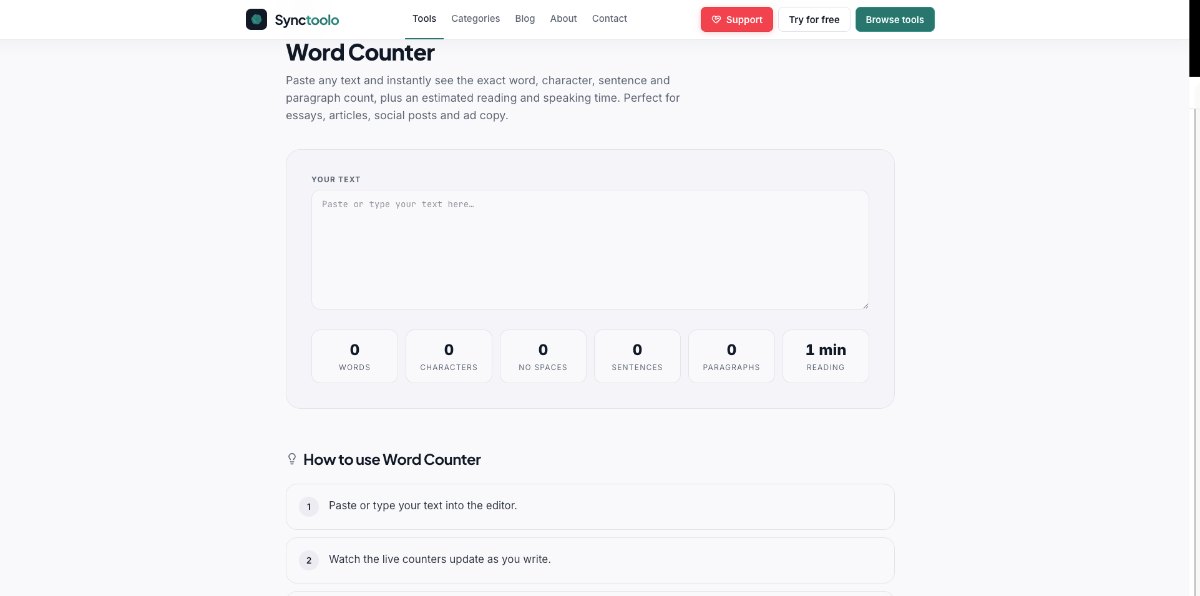
Paste your content into the editor and you can see:
Words
The total number of words in your text.
Characters
The total character count.
Characters without spaces
Useful when you need a character count that excludes spaces.
Sentences
See how many sentences your content contains.
Paragraphs
Quickly understand the structure of your text.
Reading time
Get an estimated reading duration.
Speaking time
Estimate how long the content could take to present or record.
Everything updates while you write.
When Should You Use a Word Counter?
You don't need a word counter every time you type a message.
It's most useful when length actually matters.
Use one when:
Your assignment has a word limit.
Your client requested a specific article length.
You're writing an SEO article.
Your social post has a character limit.
You're preparing a YouTube script.
You're writing a presentation.
You're creating a podcast script.
You want to estimate reading time.
You need to compare the length of multiple drafts.
In other words:
Whenever "How long is this?" matters, a word counter saves time.
Why Use Synctoolo's Word Counter?
You don't need to download software or manually calculate anything.
Synctoolo's Word Counter lets you paste or type your text and instantly see the information you need.
It's useful for everything from a 200-word social post to a long article or assignment.
And because the tool runs in your browser, you can check your content without building a complicated workflow around it.
Check your text instantly with Synctoolo's free Word Counter:
More Useful Tools for Writers
Word counting is often only one step in the writing process.
If you're working with content regularly, you may also need to:
Rewrite text
Use the AI Paraphrasing Tool to rewrite content in different styles while preserving the meaning.
Summarize long content
Create blog drafts
Use the AI SEO Blog Generator when you want help turning a topic into a structured SEO blog draft.
Fix capitalization
A word counter might seem like a very simple tool.
But that's exactly what makes it useful.
You don't need to spend five minutes checking how many words are in an essay. You don't need to guess whether a social post is too long. And you don't need to manually estimate how long a script will take to read.
Paste your text.
Check the numbers.
Make the necessary edits.
Move on.
When content length matters, an online word counter turns guesswork into a number.
What is a word counter?
A word counter is an online tool that automatically counts the number of words in a piece of text. Modern tools can also provide character, sentence, paragraph, reading-time, and speaking-time statistics.
Why do students use word counters?
Students use word counters to check whether essays, assignments, and other academic work meet required minimum or maximum word counts.
Can a word counter count characters too?
Yes. Many online word counters provide character counts both with and without spaces, which is useful when working with character limits.
Is word count important for SEO?
Word count by itself doesn't guarantee higher rankings. The important thing is whether the content adequately answers the user's query and provides useful information.
Can I use a word counter for social media?
Yes. A word counter with character counting is useful for checking posts, captions, headlines, and other content with platform-specific length restrictions.
Frequently Asked Questions
How is reading time calculated in a word counter?
Reading time is calculated using the average adult silent reading speed of 200 to 250 words per minute. For example, an 800-word article takes approximately 4 minutes to read.
What are the character limits for major social media platforms?
X (Twitter) allows 280 characters for standard accounts, LinkedIn posts allow up to 3,000 characters, and Instagram captions allow up to 2,200 characters.
Does the word counter count spaces as characters?
The tool displays both metrics simultaneously: character count with spaces and character count excluding spaces.
Tools mentioned in this article
FAQ
How is reading time calculated in a word counter?+
Reading time is calculated using the average adult silent reading speed of 200 to 250 words per minute. For example, an 800-word article takes approximately 4 minutes to read.
What are the character limits for major social media platforms?+
X (Twitter) allows 280 characters for standard accounts, LinkedIn posts allow up to 3,000 characters, and Instagram captions allow up to 2,200 characters.
Does the word counter count spaces as characters?+
The tool displays both metrics simultaneously: character count with spaces and character count excluding spaces.
We build and review free, privacy-first tools at Synctoolo.
Keep reading

Master title capitalization rules for articles and user interfaces. Compare AP Style, Chicago Manual of Style, and modern design system typography standards.

Avoid awkward feed cutoffs. Discover exact character limits, above-the-fold preview thresholds, and optimal copy lengths for X, Instagram, LinkedIn, YouTube, and Meta ads.